
SEO Audits in 2026: How to Find and Fix the Issues Affecting Your Website

SEO Audits in 2026: How to Find and Fix the Issues Affecting Your Website
A website can have excellent content, attractive designs, and useful services but still struggle to gain visibility on Google. Sometimes, the problem is not the content itself. Technical issues, indexing problems, poor site structure, and other SEO weaknesses can prevent search engines from understanding and ranking a website effectively.
This is where an SEO audit becomes important.
An SEO audit helps identify the problems affecting a website’s search performance. It also provides a clear direction for improving technical health, content quality, user experience, and organic visibility.
Let’s explore the important areas every website owner and SEO professional should examine in 2026.
1. What Is an SEO Audit?
An SEO audit is a detailed examination of a website to identify issues that may affect its visibility in search engines.
It generally covers three major areas:
- Technical SEO: Examines crawling, indexing, website speed, security, and site structure.
- On-Page SEO: Reviews page titles, meta descriptions, headings, content quality, and internal linking.
- Off-Page SEO: Examines backlinks, referring domains, link quality, and brand mentions.
A complete audit should not simply produce a list of errors. It should explain why those issues matter and how to resolve them.
2. Technical SEO: Check Whether Search Engines Can Access Your Website
Technical SEO creates the foundation for effective search visibility. Even high-quality content may struggle to appear in search results if search engines cannot properly crawl or index it.
Here are some important technical checks.
A. Check Website Crawlability and Indexability
Start by checking whether search engines can access important website pages.
Review:
- Robots.txt configuration.
- Noindex directives.
- XML sitemap availability.
- Internal links to important pages.
- HTTP response status codes.
Google Search Console’s Page Indexing report can help identify pages that are not indexed and explain the reported reasons.
Remember that a page being crawled does not automatically mean it will be indexed.
B. Review XML Sitemaps and Robots.txt
An XML sitemap helps search engines discover important URLs on a website.
Check whether:
- The sitemap contains valid, canonical URLs.
- Important pages are included.
- Redirected and broken URLs are excluded.
- The sitemap is submitted through Google Search Console.
The robots.txt file should also be reviewed carefully. Incorrect blocking rules can prevent search engines from accessing important website resources or pages.
C. Identify Broken Links and Redirect Issues
Broken links create problems for users and can waste search engine crawling resources.
During an audit, look for:
- 404 errors.
- 5xx server errors.
- Redirect chains.
- Redirect loops.
- Internal links pointing to redirected URLs.
For example, if an important service page has moved, update internal links to point directly to its new URL. Use a relevant 301 redirect when a permanent URL change is necessary.
D. Analyze Core Web Vitals and Page Speed
Website performance affects user experience. Google uses Core Web Vitals as part of its page experience systems.
The three main Core Web Vitals measurements are
- LCP (Largest Contentful Paint): Measures loading performance. Good: 2.5 seconds or less.
- INP (Interaction to Next Paint): Measures responsiveness. Good: 200 milliseconds or less.
- CLS (Cumulative Layout Shift): Measures visual stability. Good: 0.1 or less.
Tools such as PageSpeed Insights and Lighthouse can help identify performance problems.
Common improvements include compressing images, reducing unnecessary JavaScript, improving server response times, and implementing browser caching.
E. Check Mobile Usability
Most websites receive visitors from different screen sizes and devices.
Check whether:
- Content fits smaller screens.
- Text is readable without zooming.
- Buttons and links are easy to tap.
- Navigation works correctly.
- Important content is accessible on mobile devices.
Google primarily uses the mobile version of website content for indexing and ranking.
F. Review Canonical Tags and Duplicate Content
Duplicate or similar URLs can create confusion about which page should appear in search results.
Review canonical tags to ensure they point to the preferred version of each page.
For example, these URLs may display similar content:
- example.com/services
- example.com/services/
- example.com/services?source=campaign
Check whether the URLs are intentionally accessible and whether the canonical implementation reflects the preferred page.
G. Validate Structured Data
Structured data helps search engines understand the information presented on a page.
Depending on the website, relevant schema types may include:
- Organization
- Local Business
- Product
- Article
- BreadcrumbList
- Service
Use Google’s Rich Results Test and Schema.org Validator to identify implementation errors.
However, valid structured data does not guarantee rich result appearances.
3. On-Page SEO: Evaluate Content and Page Optimization
After reviewing the technical foundation, examine how individual pages are optimized.
Important areas include:
Page Titles: Each important page should have a descriptive, relevant title that communicates its main topic.
Meta Descriptions: Write useful descriptions that explain what visitors can expect from the page.
Heading Structure: Use logical H1, H2, and H3 headings to organize information.
Keyword Relevance: Ensure that the page addresses the search intent behind its target keywords.
Content Quality: Check whether the content is accurate, useful, original, and sufficiently detailed.
Internal Linking: Connect related pages using descriptive anchor text. This helps users discover relevant information and helps search engines understand website structure.
Avoid adding keywords unnaturally just to increase keyword frequency. Content should primarily help readers.
4. Off-Page SEO: Examine Backlinks and Website Authority Signals
Backlinks can help search engines discover pages and understand relationships between websites.
During an off-page SEO audit, examine:
- Total backlinks.
- Referring domains.
- Relevant linking websites.
- Anchor text distribution.
- Lost and newly acquired links.
- Suspicious or unnatural linking patterns.
Tools such as Ahrefs, Semrush, and other backlink analysis platforms can help with this process.
However, a higher backlink count does not automatically mean better SEO performance. Relevance, quality, and context matter.
5. Essential Tools for Conducting an SEO Audit
Using the right tools makes the auditing process more efficient.
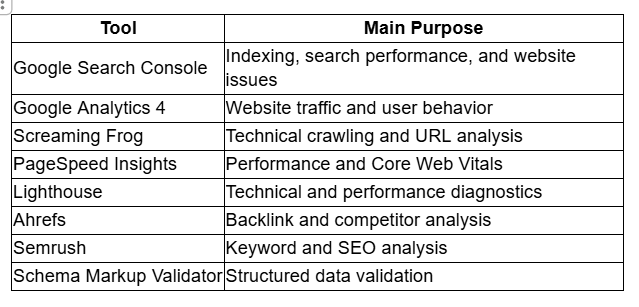
No single tool provides a complete picture. Combining several tools helps identify issues that may otherwise go unnoticed.
6. Common SEO Audit Mistakes to Avoid
An SEO audit is only useful when its findings lead to meaningful improvements.
Some common mistakes include:
- Fixing every warning without understanding its impact.
- Focusing only on Domain Authority or backlink numbers.
- Ignoring important pages that are not indexed.
- Treating every 404 error as a critical issue.
- Making unnecessary changes to URLs.
- Ignoring mobile performance.
- Publishing more content without reviewing existing pages.
- Completing an audit without checking whether the fixes worked.
Prioritization is important. Start with issues that prevent important pages from being crawled, indexed, or accessed properly.
7. What Should You Do After Completing an SEO Audit?
An audit should lead to a practical improvement plan.
A simple approach is to divide the findings into three priority levels:
High Priority
- Important pages blocked from indexing.
- Incorrect robots.txt directives.
- Server errors affecting important pages.
- Incorrect canonical implementations.
- Critical website security issues.
Medium Priority
- Internal linking improvements.
- Page speed optimization.
- Duplicate or poorly optimized metadata.
- Structured data improvements.
Low Priority
- Minor image optimization.
- Small content formatting improvements.
- Non-critical metadata refinements.
After implementing changes, revisit Google Search Console, crawl the website again, and monitor performance over time.
Do not expect every SEO issue to produce an immediate ranking improvement. Some changes take time to be recrawled, processed, and reflected in search results.
Conclusion
SEO audits are not simply technical checklists. They help website owners understand what is preventing their websites from performing effectively in organic search.
In 2026, a successful SEO audit should combine technical health, useful content, strong website architecture, user experience, and reliable performance data.
The real value of an audit is not the number of errors it identifies. It is the quality of the improvements made after identifying those errors.
Let’s Discuss
When conducting an SEO audit, which area do you investigate first: Technical SEO, On-Page SEO, or Backlink Analysis?
Have you ever discovered a technical issue that significantly affected a website’s search visibility? Share your experience in the comments.